Tag Traceback is a quick and easy way to see all reports that a particular tag has appeared in.
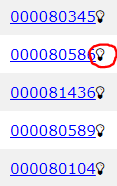 |
To view the Tag Traceback simply click the lightbulb icon next to any tag id. |
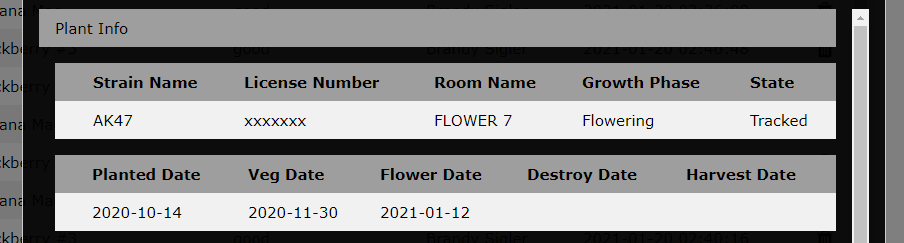
A popup will open displaying some basic data on the tag in question.
Below this section is a list of reports that contain this tag.
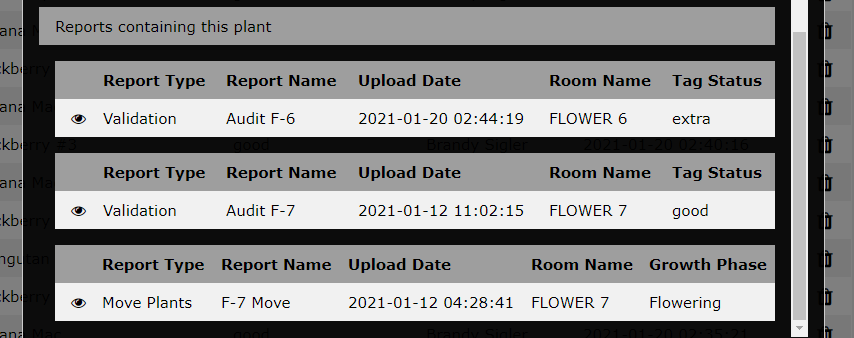
In this example we see that this tag appeared in the "FLOWER 6" audit, even though it showed up in the "FLOWER 7" audit just a week prior.
This traceback is very useful for investigating inventory discrepancies. Lets look at a hypothetical (but very plausible) scenario.
- A plant tag shows up as missing while auditing "FLOWER 6"
- Tag Traceback reveals that it was involved in a "Move Plants" report to "FLOWER 6" recently.
- Tag Traceback also shows that it was considered an extra tag while auditing "VEG 2"
- From this info it is pretty easy to conclude that human error left the physical plant in "VEG 2" while electronically it had been moved to "FLOWER 6"
- Using the Desperado's Seek-and-Find feature, the plant can be located and moved to "FLOWER 6"
Comments
0 comments
Please sign in to leave a comment.